
10 Best Jira Integrations for Product Managers (2026)
The 10 best Jira integrations for product managers. Compared on Slack sync, roadmap features, pricing, and setup time. Free options included.

· Updated
The best Jira integrations for product managers in 2026 are IdeaLift (Slack/Discord feedback capture with bi-directional Jira sync), ProductBoard (roadmap sync), Figma (design specs), and the native Slack for Jira Cloud connector (free notifications). For teams whose primary need is Slack-to-Jira workflows, the best Slack Jira integration is IdeaLift if you want bi-directional sync of ideas and decisions, or the official Slack for Jira Cloud app if you only need to create or comment on issues from Slack. Below is a detailed breakdown of all 10, with pricing, setup notes, and recommended stacks by team size.
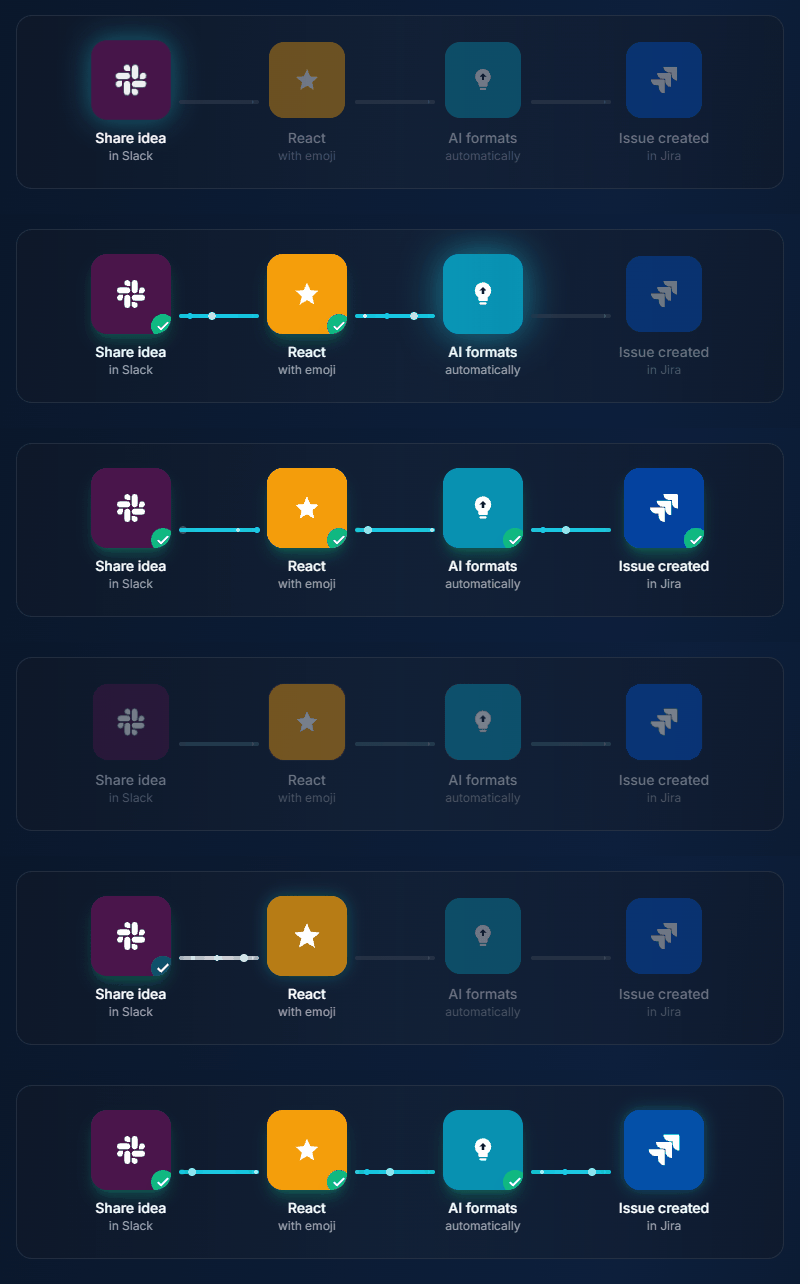
Jira is where work gets done. But product management happens everywhere else—Slack conversations, customer calls, support tickets, roadmap discussions.
The right integrations bridge that gap, connecting your product workflow to where insights and decisions actually happen.
This guide covers the 10 best Jira integrations specifically for product managers—not developers, not project managers. PM-focused tools that make Jira work for product workflows. If you're also evaluating standalone feedback tools, see our feature request tracking software comparison.
Comparing IdeaLift vs Canny directly? This post compares 10 Jira integrations for PMs. For a side-by-side IdeaLift vs Canny breakdown — pricing, feature matrix, switch-in-15-minutes guide — see IdeaLift vs Canny.
Best Slack to Jira integration in 2026 (quick answer)
If you searched specifically for the best Slack-Jira integration, the answer depends on what you need to do:
| Need | Best pick | Why |
|---|---|---|
| Notifications + create issues from Slack | Slack for Jira Cloud (Atlassian's official, free) | One-time install, native, free, no extra account. Limited to issue creation and notifications. |
| Capture feature requests and decisions from Slack threads → Jira backlog with full context | IdeaLift | Bi-directional. Emoji reaction creates a Jira ticket with the full thread attached. Decisions auto-update the ticket status. |
| Heavy two-way sync (changes in Jira reflect in Slack threads) | IdeaLift + Slack for Jira combined | The official app handles the comment-back. IdeaLift handles the inbound capture and decision audit trail. |
| Status updates only (no creation) | Slack for Jira Cloud | Free is hard to beat. |
The single most overlooked feature in 2026 is two-way decision sync. When a Jira ticket gets resolved as "Won't Do" or moved to "Cancelled," that's a decision the Slack thread that originally raised it should know about. Of the integrations below, only IdeaLift propagates that decision back to the source thread automatically (see ambient decision detection).
Quick Overview
| Integration | Purpose | Price |
|---|---|---|
| IdeaLift | Capture ideas from Slack/Discord → Jira | Free (Starter) |
| ProductBoard | Roadmapping + Jira sync | $20/user/mo |
| Slack for Jira | Create issues from Slack | Free |
| Miro | Visual collaboration + Jira | Free-$10/user |
| Loom | Video in Jira tickets | Free-$15/user |
| Figma | Design specs in tickets | Free-$15/user |
| Gong | Customer call insights | Enterprise |
| Intercom | Support → Jira escalation | $74/mo+ |
| Zendesk | Support tickets → Jira | Included |
| Canny | Public feedback → Jira | $79/mo |
1. IdeaLift – Capture Ideas from Chat
Category: Feedback Capture Price: Free starter, $79/mo Pro, $199/mo Growth (flat, not per-user) | Atlassian Marketplace
What It Does
IdeaLift captures product ideas from Slack, Discord, and Teams and syncs them directly to Jira. No copy-paste, no context lost.
How It Works
- Someone posts a feature request in Slack
- Anyone reacts with an emoji (e.g., 👽)
- The message is captured with full thread context
- AI summarizes long conversations
- One-click push to Jira as an issue
Why PMs Love It
- Capture at the source: Ideas flow from where they're discussed to where they're tracked
- Thread context: The full conversation, not just one message
- AI summary: Long threads become clear issue descriptions
- Bi-directional: When Jira issue is resolved, Slack gets notified
Best For
Teams with active Slack or Discord channels where feature requests and feedback happen in real-time.
Rating: ★★★★★ (Essential for chat-heavy teams)
2. ProductBoard – Roadmapping Power
Category: Product Management Suite Price: $20/user/month | ProductBoard Jira Integration
What It Does
ProductBoard is a full product management platform that syncs with Jira for execution. Plan in ProductBoard, build in Jira.
How It Works
- Collect and prioritize features in ProductBoard
- Push features to Jira as issues/epics
- Development progress syncs back to ProductBoard
- Roadmap updates automatically
Why PMs Love It
- Separation of concerns: Strategy in ProductBoard, execution in Jira
- Customer context: See who requested features, attach customer data
- Prioritization: Scoring frameworks built-in
- Roadmap sync: Status changes reflect in both tools
Best For
Product teams who want a dedicated PM tool that integrates with existing Jira workflows.
Rating: ★★★★☆ (Great for larger teams)
3. Slack for Jira Cloud (Official)
Category: Communication Price: Free | Atlassian Marketplace
What It Does
Atlassian's official Slack integration creates Jira issues from Slack messages and sends Jira notifications to Slack channels.
How It Works
- Use
/jira createin any Slack channel - Fill out the modal with issue details
- Issue created in Jira
- Get notifications when issues change
Why PMs Love It
- Quick capture: Create issues without leaving Slack
- Notifications: Stay updated without living in Jira
- Free: No additional cost
- Official: Supported by Atlassian
Limitations
- Manual action required (no auto-capture)
- No thread context
- Basic functionality
Best For
Teams wanting basic Slack → Jira without additional tools.
Rating: ★★★☆☆ (Good baseline, limited features)
4. Miro – Visual Collaboration
Category: Whiteboarding & Diagramming Price: Free-$10/user/month | Miro Jira Integration
What It Does
Miro is a visual collaboration platform. The Jira integration lets you create issues from Miro boards and embed Jira data in your visual workflows.
How It Works
- Create sticky notes or cards in Miro during brainstorming
- Convert cards to Jira issues with one click
- Jira issue status reflects in Miro board
- Embed Miro boards in Jira tickets
Why PMs Love It
- Visual planning: Story mapping, roadmapping, brainstorming
- Workshop to backlog: Turn workshop outputs into Jira issues
- Status sync: See development progress on visual boards
- Stakeholder collaboration: Non-technical people can contribute
Best For
PMs who run workshops, story mapping sessions, or visual roadmapping.
Rating: ★★★★☆ (Excellent for visual thinkers)
5. Loom – Video Context
Category: Video Communication Price: Free-$15/user/month | Loom Jira Integration
What It Does
Loom lets you record quick videos and embed them directly in Jira tickets. Perfect for explaining context, showing bugs, or demonstrating workflows.
How It Works
- Record a Loom explaining a feature or showing a bug
- Paste Loom link in Jira ticket description
- Video embeds inline (playable without leaving Jira)
Why PMs Love It
- Show, don't tell: Video is clearer than written specs
- Async communication: Explain once, everyone can watch
- Bug reproduction: Show exactly what happened
- User context: Attach customer Looms to tickets
Best For
Distributed teams, complex features, and bug reports.
Rating: ★★★★☆ (Simple but powerful)
6. Figma – Design Integration
Category: Design Price: Free-$15/user/month | Figma Jira Integration
What It Does
Embed Figma designs directly in Jira tickets. Designs update live—no stale screenshots.
How It Works
- Paste Figma link in Jira ticket
- Design preview embeds inline
- Click to open full Figma file
- Changes in Figma reflect automatically
Why PMs Love It
- Single source of truth: No outdated screenshots
- Context in tickets: Designers and developers see the same spec
- Version linking: Link to specific Figma versions
- Reduces back-and-forth: "See Figma" is a complete spec
Best For
Any team with designers using Figma.
Rating: ★★★★★ (Essential for PM-designer collaboration)
7. Gong – Customer Intelligence
Category: Revenue Intelligence Price: Enterprise | Gong Jira Integration
What It Does
Gong records and analyzes customer calls. The Jira integration lets you link call snippets to issues, bringing customer voice into development.
How It Works
- During a customer call, Gong captures feedback
- Create a Jira issue directly from Gong
- Relevant call snippets attach to the issue
- Engineers hear exactly what customers said
Why PMs Love It
- Customer voice: Real quotes, not PM's interpretation
- Evidence-based prioritization: "12 customers asked for this"
- Competitive intel: Link competitor mentions to issues
- Alignment: Engineering hears customers directly
Best For
B2B teams with sales/CS calls and Gong already deployed.
Rating: ★★★★☆ (Powerful but enterprise-priced)
8. Intercom – Support Escalation
Category: Customer Support Price: $74/month+ | Intercom Jira Integration
What It Does
Intercom handles customer support chat. The Jira integration escalates conversations to Jira issues when bugs or feature requests surface.
How It Works
- Support identifies a bug or feature request in Intercom
- Create Jira issue from conversation
- Conversation context attaches to issue
- Issue updates can post back to Intercom
Why PMs Love It
- Support → Product pipeline: Feature requests don't get lost
- Customer context: Full conversation attached
- Close the loop: Notify customer when fixed
- Track patterns: See how many conversations led to issues
Best For
Teams using Intercom for support who want feedback flow to Jira.
Rating: ★★★★☆ (Great for support-heavy products)
9. Zendesk – Support Tickets
Category: Customer Support Price: Included with Zendesk | Zendesk Jira Integration
What It Does
Similar to Intercom—escalate Zendesk tickets to Jira issues when they require development work.
How It Works
- Support agent identifies issue needing development
- Create linked Jira issue from Zendesk
- Ticket and issue stay connected
- Issue resolution updates ticket
Why PMs Love It
- Established workflow: Works with existing support process
- Bi-directional linking: Support sees issue progress
- Customer notification: Easy to update when fixed
- Reporting: Track issues originating from support
Best For
Teams using Zendesk for customer support.
Rating: ★★★★☆ (Solid integration)
10. Canny – Public Feedback
Category: Feedback Management Price: $79/month | Canny Jira Integration
What It Does
Canny manages public feedback boards. The Jira integration pushes voted-on features to Jira for building.
How It Works
- Customers vote on features in Canny
- PM decides to build a feature
- Push to Jira as issue with vote count and context
- Status syncs between Canny and Jira
Why PMs Love It
- Customer votes in Jira: See demand data on issues
- Status sync: Update Canny when shipped
- Changelog: Automatically notify voters
- Public roadmap: Customers see what's planned
Best For
B2C or developer-focused products with public feedback needs.
Rating: ★★★★☆ (Best for public feedback workflows)
Honorable Mentions
Confluence
- Wiki/documentation embedded in Jira
- PRDs, specs, meeting notes linked to issues
- Essential for documentation-heavy teams
GitHub/GitLab
- Code commits linked to issues
- PR status in Jira
- Essential for any development workflow
Trello
- Visual kanban for lighter workflow
- Good for marketing/design collaboration
- Syncs with Jira for complex projects
Zapier
- Connect anything to Jira
- Endless automation possibilities
- More complex setup, unlimited flexibility
Integration Stacks by Team Type
Early-Stage Startup
| Function | Tool |
|---|---|
| Feedback capture | IdeaLift |
| Design | Figma |
| Video | Loom |
| Core PM | Jira |
Cost: ~$100/month
Growing B2B Team
| Function | Tool |
|---|---|
| Feedback capture | IdeaLift |
| Support escalation | Intercom |
| Design | Figma |
| Visual planning | Miro |
| Core PM | Jira |
Cost: ~$250/month + per-user costs
Enterprise Product Team
| Function | Tool |
|---|---|
| Product suite | ProductBoard |
| Customer intel | Gong |
| Support | Zendesk |
| Public feedback | Canny |
| Design | Figma |
| Core PM | Jira |
Cost: $1,000+/month
Integration Best Practices
1. Don't Over-Integrate
Every integration adds complexity. Start with 3-4 essential integrations. Add more only when needed.
2. Define the Source of Truth
For each data type, designate one system as truth:
- Features: ProductBoard or Jira
- Designs: Figma
- Customer feedback: IdeaLift or Canny
- Status: Jira
3. Set Up Bi-Directional Sync Carefully
Bi-directional sync is powerful but can create loops. Test thoroughly before rolling out.
4. Document Your Workflow
Write down: "When X happens in [tool], Y happens in Jira." Share with team.
5. Review Quarterly
Integrations you set up 6 months ago might not be used. Audit and remove dead weight.
Conclusion
The right Jira integrations connect your product workflow:
Essential for all PMs:
- Slack for Jira (basic communication)
- Figma (design specs)
- Loom (video context)
Essential for feedback-driven teams:
- IdeaLift (chat capture)
- Intercom/Zendesk (support escalation)
- Canny (public feedback)
Essential for larger teams:
- ProductBoard (roadmapping)
- Miro (visual planning)
- Gong (customer intelligence)
Start with what solves your biggest pain point. Expand from there. Need help choosing a feedback tool first? See our best product feedback tools comparison.
Related reading: See how to send Slack messages to Jira automatically, or set up a Discord-to-GitHub integration for open source teams.
FAQ
What are the best Jira integrations for product managers?
The top Jira integrations for PMs are IdeaLift (captures ideas from Slack and Discord into Jira), ProductBoard (roadmap planning with bidirectional Jira sync), Figma (live design embeds in tickets), and the native Slack for Jira app (free notifications and basic issue creation). The right combination depends on team size and workflow. Most teams start with 3-4 and expand from there.
How do you set up Jira for product management?
Start with the native Slack for Jira integration for basic notifications. Add a feedback capture tool like IdeaLift to route ideas from chat into your backlog automatically. Connect Figma for design specs and Loom for async video context. Define one system as your source of truth for each data type and document the workflow so the whole team follows it.
What Jira plugins help with roadmap planning?
ProductBoard is the strongest roadmap tool with Jira integration. It syncs features bidirectionally so you plan in ProductBoard and build in Jira. Miro adds visual story mapping and workshop-to-backlog workflows. For teams that want everything in Jira, Advanced Roadmaps (built into Jira Premium) handles timeline planning natively.
Can you capture Slack feedback in Jira?
Yes. The native Slack for Jira app lets you create tickets from individual messages using /jira create. For full thread context, IdeaLift captures entire Slack conversations, uses AI to summarize them, and pushes structured issues to Jira with participants and discussion history preserved. Zapier and Make can also create tickets from Slack triggers but miss thread context.
What is the best Slack to Jira integration in 2026?
The best Slack to Jira integration depends on your needs. For free basic ticket creation, use Atlassian's official Slack for Jira Cloud app. For automatic feedback capture with AI summarization and full thread context, IdeaLift is the strongest option. Halp (now Jira Service Management) handles IT ticketing from Slack. For custom automations, Zapier connects Slack triggers to Jira actions but requires manual setup per workflow.
Can Jira be integrated with Slack?
Yes. Jira integrates with Slack through multiple methods. The official Slack for Jira Cloud app (free) adds notifications and /jira create commands. IdeaLift adds emoji-triggered capture with AI summaries. Jira Service Management includes a built-in Slack integration for IT tickets. Zapier and Make offer custom automations between the two platforms. Most product teams use at least two of these together.
What is the best Slack Jira integration in 2026?
For free notifications and basic issue creation from Slack, the official Slack for Jira Cloud app from Atlassian. For capturing feature requests and product decisions from Slack threads with full context preserved into the Jira ticket, IdeaLift. Most product teams run both: the official app for engineering notifications, IdeaLift for inbound feedback capture and the decision audit trail. The two don't conflict.
What is two-way Slack-Jira sync?
Two-way sync means changes in Jira are reflected back in Slack and vice versa. The official Slack for Jira app supports comment-back (a Jira comment shows in the Slack thread) but doesn't propagate decision events. IdeaLift adds decision-level two-way sync: when a Jira ticket is resolved as "Won't Do" or moved to "Cancelled", the original Slack thread that raised the request gets notified with the closure reason. See ambient decision detection for how this works across all 12 supported channels.
Who is Jira's biggest competitor?
For project management, Jira's biggest competitors are Linear (modern UI, popular with startups), Asana (broader work management), and Monday.com (visual workflows). For product management specifically, ProductBoard, Aha!, and Shortcut compete with Jira when paired with roadmapping features. Many teams keep Jira for engineering execution and add specialized tools for product planning and feedback management.
Is Jira being phased out?
No. Atlassian is actively investing in Jira with major updates in 2025-2026 including Jira Product Discovery, AI features, and the new team-managed project experience. Jira Server was sunset in favor of Jira Cloud and Jira Data Center, which caused migration concerns. But Jira Cloud is growing, not shrinking. If anything, Atlassian is expanding Jira's scope into product management territory that was previously the domain of standalone tools.
Is Slack owned by Atlassian?
No. Slack is owned by Salesforce, which acquired it in 2021 for $27.7 billion. Atlassian is a separate company that makes Jira, Confluence, and Trello. The two integrate well because Atlassian built an official Slack for Jira connector. The confusion comes from how tightly Slack and Jira are used together by engineering and product teams.
Losing ideas in Slack? Try IdeaLift free →
Free Resource
Rescue Your Lost Feature Requests
A 5-step audit to find the ideas hiding in your team chat
Ready to stop losing ideas?
Capture feedback from Slack, Discord, and Teams. Send it to Jira, GitHub, or Linear with one click.
Continue Reading
View allSlack to Jira Workflow: The Complete Integration Guide for Product Teams
The Slack to Jira workflow, 5 methods compared honestly. Native integration, bots, automation, and what each one captures (or silently drops). Pick the right one.
How to Migrate from Aha! Without Losing Critical Data
Complete guide to migrating from Aha! without losing critical product data, workflows, or team productivity. Systematic approach ensures zero downtime and preserves business continuity.
Produktfeedback-Management steigert Kundenzufriedenheit um durchschnittlich 23% bei systematischer Umsetzung
Systematisches Produktfeedback-Management steigert Kundenzufriedenheit um 23%. Automatisierte Prozesse für Sammlung, Analyse und Integration in 4 kritischen Phasen.